A guide to installing the latest version of 7-Zip on Debian/Ubuntu. This resolves bugs present in p7zip, such as the inability to compress large files.
Why Manual Installation is Necessary
p7zip is outdated and has bugs (cannot compress files larger than 5GB).
The 7zip package in apt repositories is also an older version, so downloading from the official website is required.
Download from the 7-Zip official website
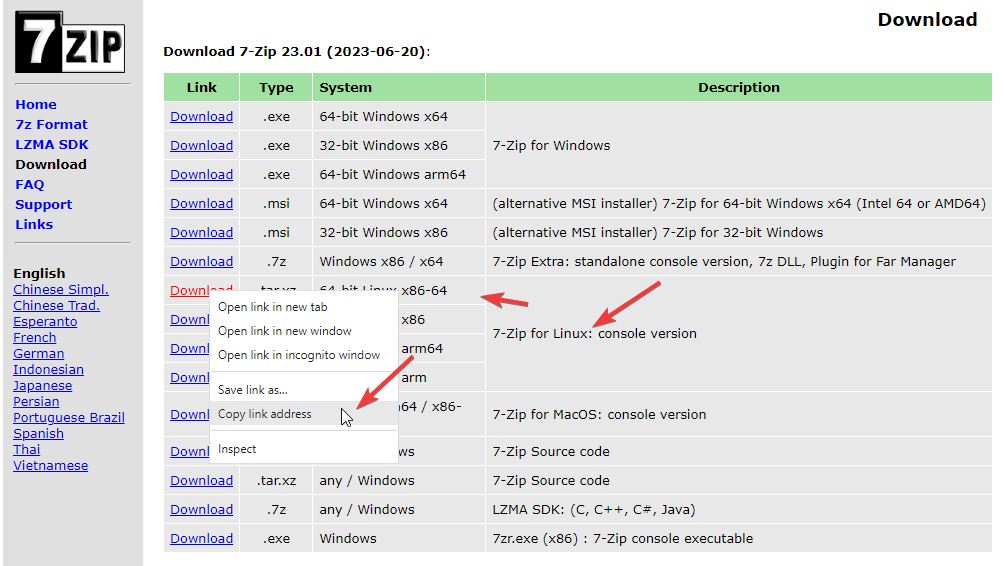
Visit the official download page to find the latest version package and copy the download link.
Official Download Page
# Navigate to download directorycd ~/Downloads
# Download the filewget -O 7zip.tar.xz download-link
Extract the archive
tar -xf 7zip.tar.xz --one-top-level
Install
Copy the 7zz executable to the /usr/local/bin/ directory to complete the installation.
Important
Since /usr/local/bin is a system executable directory, sudo privileges are required to copy files.
The 7-Zip executable is named 7zz, which differs from p7zip’s 7z. Therefore, the command after installation is 7zz rather than 7z. For example: 7zz a test.7z test.txt.
If you prefer to use the 7z command, first remove p7zip to avoid conflicts (if installed), then create a symbolic link pointing to 7zz: sudo ln -s /usr/local/bin/7zz /usr/local/bin/7z.
This comprehensive guide demonstrates how to build a complete Docker container monitoring system using Prometheus, Node Exporter, cAdvisor, and Grafana. We’ll cover creating Docker networks, preparing Prometheus configuration, deploying monitoring services with Docker Compose, and configuring Grafana data sources and dashboards to effectively monitor Docker container performance and status.
This guide walks you through setting up a monitoring system for Nginx Proxy Manager using Promtail, Loki, and Grafana. By parsing Nginx logs and visualizing the data, you can track traffic patterns, status codes, and other key metrics. We’ll cover deploying Grafana, Loki, and Promtail, configuring Nginx Proxy Manager with geoip2 and JSON logging, and setting up the data source and dashboard in Grafana.